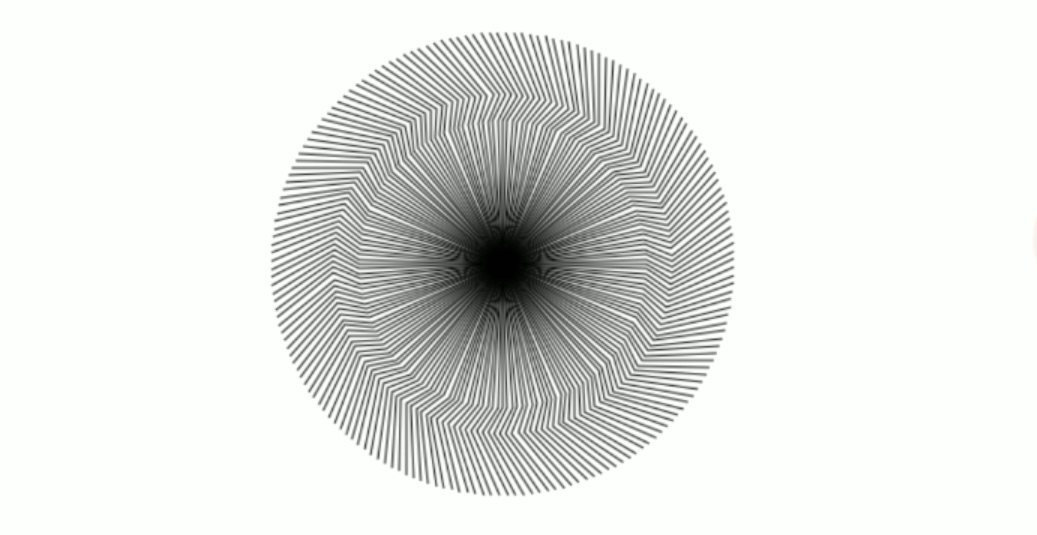
In this blog we build a circular design using turtle module , it’s a in-built module in python so we doesn’t install it using pip command. We built a simple circular design within 15-20 lines of code using turtle module and for loop.
First of all we import turtle module import turtle and then create a window using ninja=turtle.Turtle() code then we create a loop which runs 180 times for i in range(180): and then using turtle functions like forward, backward, penup , pendown, setposition ,left , right we create a design at last we use turtle.done() to complete our code.
import turtle
ninja = turtle.Turtle()
ninja.speed(10)
for i in range(180):
 ninja.forward(100)
 ninja.right(30)
 ninja.forward(20)
 ninja.left(60)
 ninja.forward(50)
 ninja.right(30)

 ninja.penup()
 ninja.setposition(0, 0)
 ninja.pendown()

 ninja.right(2)

turtle.done()
In the below video Pydroid 3 is used which runs the Python code.
 Hardik Kushwaha
Leave a comment